
 Development
 QLS
QLS Business
 Healthcare
 Health & Fitness
 Technology
 Teaching
 Lifestyle
 Design
-
×
 Microsoft Teams - Master Microsoft Teams
1 × £30
Microsoft Teams - Master Microsoft Teams
1 × £30 -
×
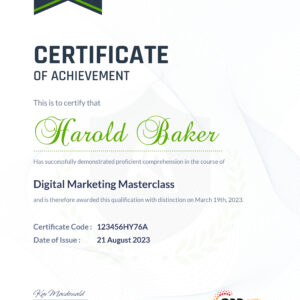 PDF Certificate (Special 65% Discount- Only For Preorder)
1 × £5.99
PDF Certificate (Special 65% Discount- Only For Preorder)
1 × £5.99
Subtotal: £35.99

 Microsoft Teams - Master Microsoft Teams
1 × £30 PDF Certificate (Special 65% Discount- Only For Preorder)
1 × £5.99
Microsoft Teams - Master Microsoft Teams
1 × £30 PDF Certificate (Special 65% Discount- Only For Preorder)
1 × £5.99 Subtotal: £35.99

Registering for this site is easy. just fill in the fields below, and we’ll get a new account set up for you in not time.


 PROMO Video
Introduction on Microsoft Teams
Free and Paid versions
Accessing Teams – Web or Desktop
Installing Desktop
Managing Teams and Members
Inviting Members
Managing Channels
Chat
Collaboration with Word, Excel, PowerPoint
Voice & Video Calls
Meetings – Available on the Paid version of Microsoft Teams
Adding More Apps
Activity
Search Bar
Settings
Multiple Organizations
Microsoft Teams Mobile
TIP#1 – Forwarding Email
TIP#2 – Saving Items
TIP #3 – Naming Group Chats
TIP #4 – Connectors
TIP #5 – Live Captions in Meetings
TIP #6 – Top Shortcuts
TIP #7 – Customize the Environment
TIP #8 – Channel Notifications
TIP #9 – Private Channels
TIP #10 – Pin Channels
TIP #11 – Post Announcements
Order Your Certificate
Assignment – Microsoft Teams – Master Microsoft Teams
PROMO Video
Introduction on Microsoft Teams
Free and Paid versions
Accessing Teams – Web or Desktop
Installing Desktop
Managing Teams and Members
Inviting Members
Managing Channels
Chat
Collaboration with Word, Excel, PowerPoint
Voice & Video Calls
Meetings – Available on the Paid version of Microsoft Teams
Adding More Apps
Activity
Search Bar
Settings
Multiple Organizations
Microsoft Teams Mobile
TIP#1 – Forwarding Email
TIP#2 – Saving Items
TIP #3 – Naming Group Chats
TIP #4 – Connectors
TIP #5 – Live Captions in Meetings
TIP #6 – Top Shortcuts
TIP #7 – Customize the Environment
TIP #8 – Channel Notifications
TIP #9 – Private Channels
TIP #10 – Pin Channels
TIP #11 – Post Announcements
Order Your Certificate
Assignment – Microsoft Teams – Master Microsoft Teams

Subscribe to this course and 2,000+ top‑rated Training Express courses for your organization.
Try imperial academy business









 Add to Cart